Second Grade Learning Games SE
- 4.7
- Rating
- 10.00K
- Installs
- $9.99
- Price
 Analysis by App-foxy
When I look for a learning game for a child, I want something more useful than a bright screen filled with random distractions. I want a clear connection between play and schoolwork, but I also want the child to feel that they are choosing an activity rather than being handed another worksheet. Second Grade Learning Games SE aims at that middle ground with a collection of educational activities built around lessons commonly associated with second grade.
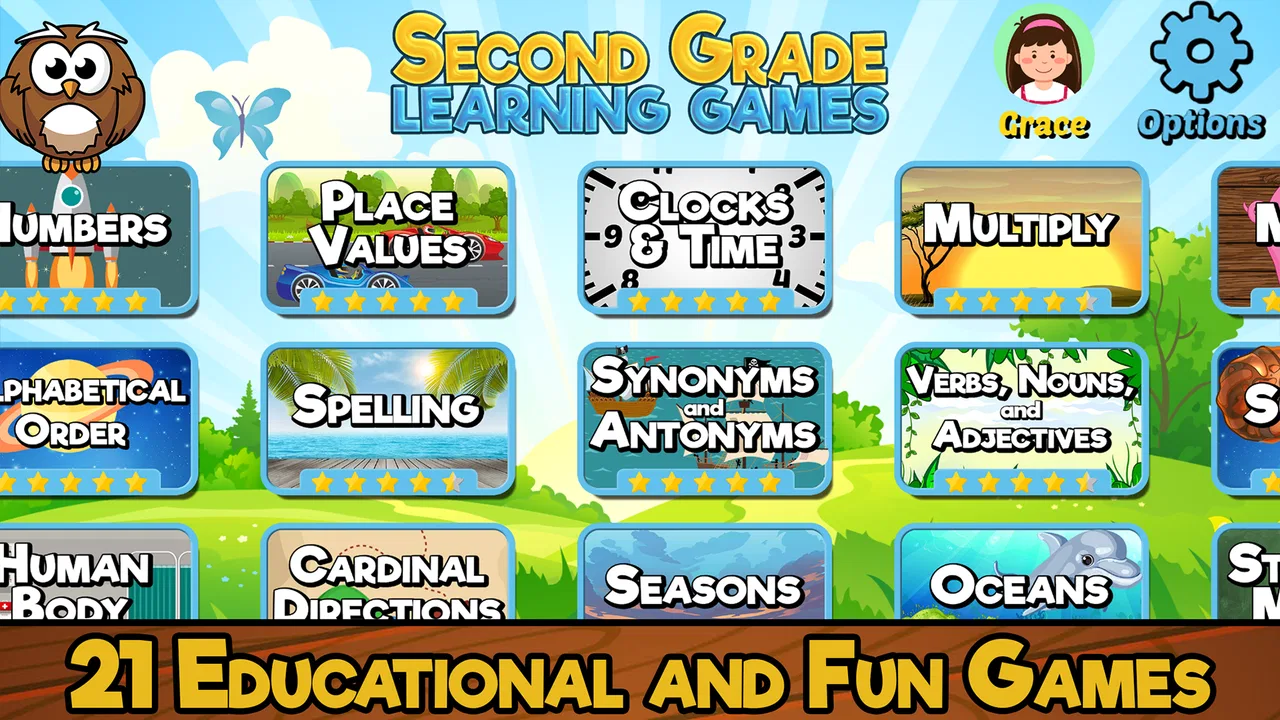
My first impression is that this is best understood as a small learning toolkit rather than one long adventure. The game is made by RosiMosi LLC and includes twenty-one activities, so a child can move between different kinds of practice instead of repeating one exercise for an entire session. That variety is its main appeal. It gives parents a practical way to offer short bursts of learning at home, while children get the immediate feedback and playful presentation they usually expect from a mobile game.
The game is listed for Everyone, which makes it suitable for the broad family audience it is targeting. It costs $9.99, so I would approach it as a paid educational resource rather than a free casual download. That distinction matters: the right question is not whether it replaces every school resource, but whether its collection of activities earns a place in a child’s regular practice routine.
You May Also Like

 Blood Strike: 2.5 Anniversary
Blood Strike’s Loadouts Turn Every Drop Into a Tactical Gamble
A close look at Blood Strike’s custom loadouts: how fast access to signature weapons reshapes its battle royale rhythm, rewards preparation, and narrows the gap between fights.

 Pandora - Music & Podcasts
Pandora’s Music Is Easy to Start, but Harder to Recover
Pandora’s strength is its low-effort path from a seed to a station. Its weak spot is how much confidence it asks you to place in connection, setup, and quiet recovery.

 8 Ball Pool
 Is Built on Rivalries, Rematches, and Routine
A close look at the rivalries, rematches, shared routines, and unanswered safety questions that turn a quick pool match into a persistent mobile community.

 Samsung Music
’s Quiet Strength Is Playing What You Already Own
Its reach comes less from spectacle than from dependable access to a personal library. That simplicity is both the app’s strongest retention engine and its ceiling.

 AccuWeather: Weather Radar
AccuWeather Review: A Quick, Clear Forecast for Everyday Decisions
For everyday plans, the best forecast is the one you can understand quickly. AccuWeather makes rain timing, radar, and local conditions easy to act on, with a few trade-offs.

 Hill Climb Racing
Why Hill Climb Racing Still Turns Crashes Into One More Run
A tiny car, a bumpy hill and one more upgrade: Hill Climb Racing keeps resurfacing because its simple chaos makes every near-miss feel personal.
More From Our News Desk
View All News


What to expect from the learning experience
Before opening it, I would set expectations carefully. This is not a substitute for a teacher, a textbook, or a child’s complete second-grade curriculum. It is a practice companion. Its value comes from making familiar school topics easier to revisit when a child needs extra repetition, a gentler start, or a change from paper exercises.
The twenty-one-game format suggests a useful rhythm. Instead of asking a child to sit through one extended lesson, I can let them try one activity, pause, and return later. That works especially well after school, when attention is limited. A short session before dinner can be more realistic than promising a long study block that quickly turns into an argument.
I also like the idea of using the activities as a bridge between formal learning and independent play. A child who resists a workbook may be more willing to attempt the same general kind of practice when it is presented interactively. That does not make every difficult topic suddenly easy, but it can lower the emotional barrier to beginning.
The average rating is 4.7 from around 600 ratings, with roughly 170 written reviews, and the game has passed 10,000 installs. Those figures do not tell me whether it will suit every child, but they do show that it has found a real audience among families looking for this kind of resource. I would still judge it by the child’s learning style rather than by popularity alone.
Who will get the most from it
I think it is a particularly good fit for a child who already understands basic classroom routines but needs more practice with second-grade material. It can also help a parent who wants a ready-made activity during a quiet period, such as a rainy afternoon or a short break while dinner is being prepared.
It may be less suitable for a child who needs intensive one-to-one instruction, highly personalized difficulty, or detailed progress reporting. A child who is far ahead may also outgrow the exercises quickly if they are looking for advanced challenges rather than reinforcement. In those cases, a teacher-guided platform, a workbook chosen for a specific weakness, or a more adaptive learning service may be a better investment.
There is another important trade-off. A collection of separate games can feel more approachable than a rigid course, but it may also require an adult to provide structure. Without a simple plan, a child may keep choosing the easiest or most entertaining activity. I would not leave the entire learning direction to the app; I would use it as a menu and help select activities that match what the child is currently practicing elsewhere.
Starting without turning setup into a lesson
The first setup should be uncomplicated: install the game on a compatible device, open it with the child nearby, and spend a few minutes exploring the available choices together. The current version is 9.2.1, and it requires at least Android 8.0. That makes checking the device before purchase worthwhile, especially if the game is intended for an older tablet that is no longer updated.
I would avoid presenting the first launch as a test. A child who hears “let’s see how much you know” may treat every mistake as a failure. Instead, I would say that we are looking around to find a game that feels comfortable. This small change in wording makes it easier for the child to experiment and gives me a better view of which activities feel natural and which ones create hesitation.
A useful first step is to let the child choose between a couple of activities, then ask them to explain what they think each one is asking them to do. That reveals confusion earlier than simply watching them tap. It also turns the adult into a quiet guide rather than someone hovering over every answer.
I would keep the first visit short. The goal is not to inspect every one of the twenty-one activities in one sitting. The goal is for the child to understand how to enter an activity, respond to a prompt, notice the result, and return to the selection screen. Once that basic loop feels familiar, later sessions can focus on learning instead of navigation.
Making the first success meaningful
The first meaningful success should be something the child can complete with a little thought but without repeated rescue. I would begin with an activity that matches a skill the child has recently practiced at school. Familiar material gives the child a fair chance to understand the game’s interaction while still reinforcing a real lesson.
When the child answers correctly, I would pause before immediately moving on. Asking, “How did you work that out?” turns a correct tap into evidence of understanding. If the answer was a guess, that is useful to know too. The game can provide practice, but the short conversation helps distinguish memory, reasoning, and luck.
If the child makes a mistake, I would resist taking over the device. I would ask them to look at the prompt again, describe what they notice, and try a different approach. This is one of the strongest ways to use a game like this: not as an automatic answer machine, but as a prompt for the child to explain their thinking.
A realistic everyday routine might look like this: after school, a parent asks the child to choose one activity connected to that day’s homework. The child plays for a few minutes, explains one answer, and then stops before becoming tired. The parent makes a quick note of the topic that caused difficulty and brings it up with the teacher or returns to it another day. That routine is more valuable than allowing unlimited, unfocused screen time.
The best first-session goal is confidence with the learning loop, not finishing a large amount of content. Once the child knows that mistakes are manageable and that each activity has a clear purpose, the game becomes easier to use consistently.
Where first-time users may feel confused
The biggest possible source of confusion is the difference between playing and learning. A child may enjoy an activity without being able to explain the skill behind it. I would occasionally ask what the game is helping them practice, using simple language. If they cannot answer, I would treat that as a sign to slow down and provide context rather than assuming the activity has failed.
Another common issue is choosing by entertainment value alone. Children naturally return to what feels easiest or most rewarding. That is not a problem for warm-up practice, but it can create an uneven routine. I would use a simple rotation: one activity the child enjoys, one connected to a current school topic, and one that offers a little more challenge. This keeps the experience positive without allowing the easiest option to dominate.
Parents may also wonder whether they need to sit beside the child for every session. In my view, the answer depends on the child and the topic. Once navigation is familiar, a child may manage a short independent session. However, new or difficult material benefits from occasional adult involvement, particularly when the child is guessing quickly or repeating the same mistake.
That does not mean constant supervision. A useful compromise is to check in at the beginning and end. At the start, choose the activity and agree on a small goal. At the end, ask the child to show one thing they learned or one question they still have. This gives the session direction without making the parent act as a full-time instructor.
It is also worth remembering that a game cannot replace physical materials in every situation. Writing numbers, forming letters, drawing diagrams, and explaining an answer aloud all develop habits that tapping a screen does not fully reproduce. I would pair the app with a pencil-and-paper exercise or a spoken explanation when the child needs to strengthen those parts of learning.
How it compares with familiar alternatives
Compared with a traditional workbook, this game is more inviting for a child who needs a change of pace. The interactive format can make repetition less dull, and the collection of activities gives parents more flexibility than following a fixed page order. The workbook still has advantages when handwriting, visible working, or a calm screen-free routine is the priority.
Compared with broad educational video platforms, this game is more focused on active response. Watching an explanation can introduce a topic, but answering within an activity asks the child to participate. On the other hand, videos may be better when a child needs a concept explained from a different angle before practice begins.
Compared with highly adaptive learning services, the appeal here is simplicity. A parent can choose an activity without building a complicated course plan. The trade-off is that I would not expect the same level of individualized progression or detailed diagnostic guidance. If a child has a clearly identified learning gap, a specialist resource may offer more precision.
The paid price also changes the comparison. At $9.99, it may be reasonable for a family that expects to use several activities over time, but it is not an impulse purchase for someone who only wants a single quick game. I would think about the child’s age, current school needs, and willingness to practice before deciding.
Building a routine that does not become repetitive
After the first successful session, I would create a light weekly pattern rather than opening the game at random. For example, one day could focus on a topic the child is currently studying, another could revisit a skill that still feels uncertain, and a third could be a free choice. The exact schedule matters less than keeping the sessions short and purposeful.
A particularly useful workflow is to connect the app to real mistakes. If homework reveals that a child is struggling with a certain kind of question, I would look for a related activity rather than simply assigning more of the same worksheet. Afterward, I would return to one paper example and ask the child to solve it without the game’s prompts. That final transfer step shows whether practice is carrying over.
I would also change who leads the session. Sometimes the adult chooses the activity; sometimes the child does. Giving the child controlled choice supports independence, while adult selection prevents the routine from becoming a loop of only familiar successes. This balance is more effective than either total freedom or total control.
Another non-obvious benefit of a multi-activity design is that it can reveal preference. A child may respond well to visual problems but avoid reading-heavy prompts, or enjoy quick recall while struggling with tasks that require patience. I would use those preferences as clues, not as permanent labels. The goal is to use a comfortable activity as an entry point and gradually bring in the less comfortable skill.
For families sharing one device, I would make the handoff explicit. Ask the child to finish the current activity before passing the device back, and keep the next session’s goal simple. This avoids the frustration of one child interrupting another and helps the game remain part of a routine instead of becoming a source of arguments.
When I would choose something else
I would skip this purchase if the child strongly dislikes screen-based learning or if the family already has several unused educational apps. More content does not automatically create more progress. In that situation, a short conversation, a library book, or a teacher-recommended exercise may be more effective.
I would also look elsewhere if I needed a formal record of progress, extensive customization, or a curriculum designed around a particular educational need. The collection is attractive because it is approachable, but families requiring close measurement should choose a tool built specifically for that purpose.
Likewise, if the child is not working at a second-grade level, the fit may be uneven. Younger children may need more basic guidance, while older or advanced children may want more complex challenges. The Everyone age rating describes the broad suitability of the content; it does not guarantee that every learner will find the academic level appropriate.
My final view after using it as a practice companion
Second Grade Learning Games SE works best when I treat it as a friendly practice shelf rather than a complete school in tablet form. Its twenty-one activities give a child variety, and its educational focus makes the screen time easier to justify than an unrelated casual game. The strongest results are likely to come from short sessions, thoughtful activity choices, and a parent who occasionally asks the child to explain an answer.
I appreciate that the game can make the first step less intimidating. A child does not need to begin with a long lesson or a pile of pages. They can try one activity, experience a manageable success, and build from there. That makes it especially useful for families trying to establish a routine without creating pressure.
At the same time, I would not buy it expecting personalized teaching, complete curriculum coverage, or a replacement for hands-on practice. Its limitations are the natural limits of a general collection of learning games. Children who need targeted intervention or detailed progress tracking will probably benefit more from a specialized alternative.
For the right family, the $9.99 cost is easiest to justify when the game becomes part of a repeatable routine: choose a relevant activity, let the child work independently when possible, discuss one success or mistake, and connect the practice to something away from the screen. With that approach, this educational game from RosiMosi LLC feels less like a digital babysitter and more like a practical second-grade reinforcement tool.
My recommendation is therefore positive but specific. I would recommend it to a parent seeking varied, low-pressure practice for a second-grade learner, especially when the child responds better to interactive activities than to another worksheet. I would pass on it when the main need is advanced instruction, formal assessment, or a fully screen-free method. For a first-time user, the safest path is simple: begin with one familiar topic, celebrate the first genuine explanation, and let the next session grow from what the child actually found easy or difficult.
FAQs for Second Grade Learning Games SE
01What is Second Grade Learning Games SE?
Second Grade Learning Games SE is an educational app designed to help children practice important second-grade skills through interactive mini-games and activities. It generally covers subjects such as mathematics, reading, spelling, grammar, science, and problem-solving. The lessons are presented in a playful format, making practice feel less like traditional homework while still encouraging repetition and basic academic development.
02What subjects and skills can children practice in the app?
The app focuses on several core skills commonly associated with second-grade learning. Depending on the activity, children may work on addition and subtraction, place value, multiplication foundations, reading comprehension, vocabulary, spelling, sentence structure, grammar, and logical thinking. Parents should review the available lesson categories because the exact content, difficulty, and curriculum coverage may vary by version or platform.
03Is Second Grade Learning Games SE suitable for independent use?
The app is designed to be approachable for young learners, with simple instructions, colorful visuals, and game-based exercises. However, children in second grade may still need occasional help understanding instructions or correcting mistakes. It works best when used as a supplement to schoolwork, with a parent or teacher checking progress and encouraging the child to explain how an answer was reached rather than simply completing activities quickly.
04Does the app require an internet connection or include in-app purchases?
Internet requirements and payment options can depend on the device, operating system, and edition installed. Some activities may be available offline after installation, while updates, advertisements, analytics, or additional content may require a connection. Before downloading, parents should check the official store listing for current information about ads, in-app purchases, subscriptions, permissions, and whether the app offers a fully unlocked version.
05Is Second Grade Learning Games SE safe and useful for children?
As an educational practice tool, Second Grade Learning Games SE can be useful for reinforcing classroom concepts in short, engaging sessions. Parents should still review the app’s privacy details, age rating, advertising policy, and requested permissions before allowing regular use. It should not replace a teacher, textbook, or personalized support, but it can provide extra practice and help children build confidence through immediate feedback.
Pros
- Covers core second-grade subjects through short
- focused activities.
- Bright visuals and simple controls are suitable for young children.
- Progressive difficulty helps children practice at their own pace.
- Works well for quick practice sessions at home or on the go.
- Rewards and playful feedback can help maintain a child’s interest.
Cons
- Some activities may feel repetitive after extended play.
- Younger children may need adult help with reading instructions.
- The educational scope may be too basic for advanced learners.
- Ads or locked content may interrupt access
- depending on the version.
- Limited customization makes it harder to tailor lessons to each child.

Second Grade Learning Games SE
Gallery